Combine AppID from Azure Logs with the Application Name – How to
If we query for AppID from Log Analytics, like:
MicrosoftGraphActivityLogs
| summarize NumberOfRequests=count() by AppId
| order by NumberOfRequests desc
we usually need to combine it with the Application name.
So we need to export all Enterprise Applications and App Registrations to csv from:
- https://portal.azure.com/#view/Microsoft_AAD_IAM/StartboardApplicationsMenuBlade/~/AppAppsPreview/menuId~/null
- https://portal.azure.com/#view/Microsoft_AAD_IAM/ActiveDirectoryMenuBlade/~/RegisteredApps
Do not forget about Managed Identities, you can do it by this query:
resources
| where type =~ ‘Microsoft.ManagedIdentity/userAssignedIdentities’
| project name, principalId = properties.principalId, clientId = properties.clientId
Make from all of them file AppIDList.csv like:
| ApplicationName | AppID |
| “VeeamM365B” | d8dff9d3-367b-4967-8a2a-f2d31c929f5d |
| “P2P Server” | 39ed2d41-3e76-4505-ae68-56c02cf713c9 |
We need to upload this file to a storage account so that it is publicly accessible.
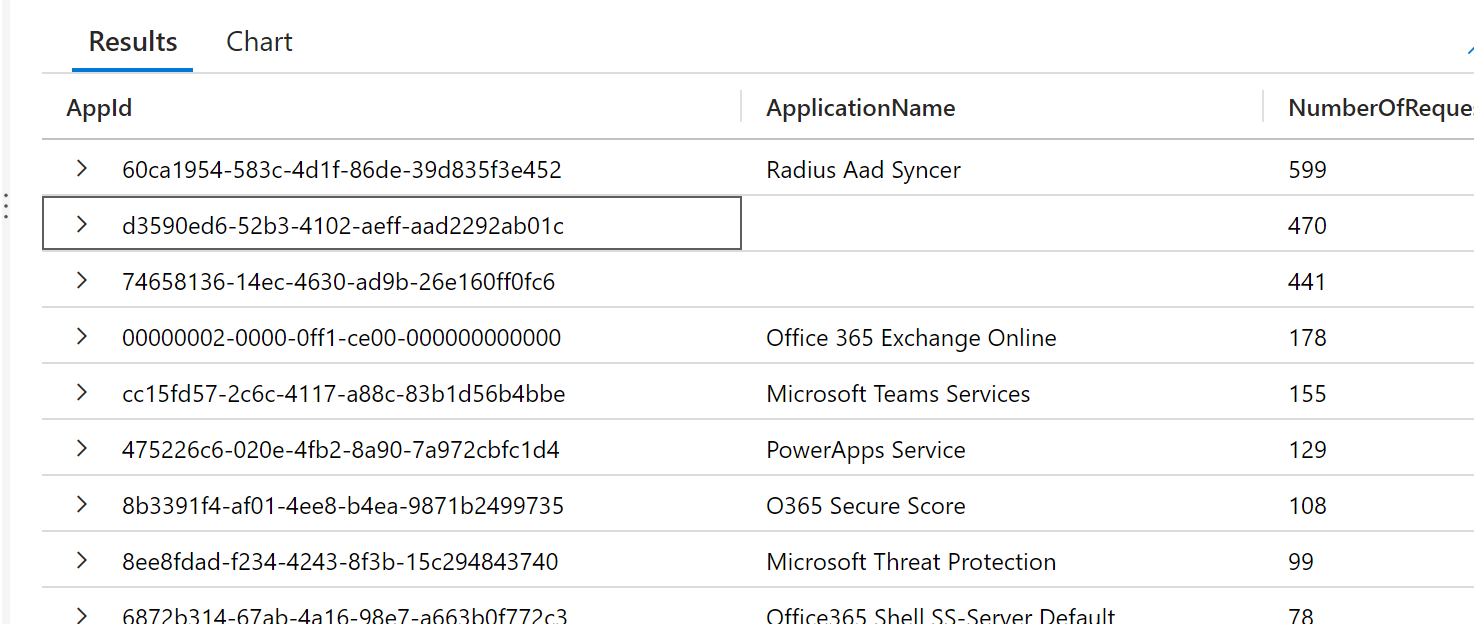
And finally, we can make a query that combines AppID with the corresponding name, so we can execute:
let ApplicationInformation = externaldata (ApplicationName: string, AppId: string, Reference: string ) [h”https://xxxx.blob.core.windows.net/xxx-allapplicationslist/xxx.csv”] with (ignoreFirstRecord=true, format=”csv”);
MicrosoftGraphActivityLogs
| summarize NumberOfRequests=count() by AppId
| lookup kind=leftouter ApplicationInformation on $left.AppId == $right.AppId
| order by NumberOfRequests desc
| project AppId, ApplicationName, NumberOfRequests
So finally we got AppID and the Application Name.